Running a Ruby MCP Server in Production

In a previous post, AI Assistant for Our Blog Writing Process , I introduced the assistant we built to help with our blog writing. At the core of that assistant is an MCP server, which serves as the source of truth for both of our blogs. It exposes that knowledge through tools the client can call and documentation the client can read.
Getting an MCP server running is the easy part. Every quickstart, in every language, gives you a server that runs as a subprocess on your own machine and disappears when the client exits. That’s enough to experiment locally, but it’s a long way from something a team can rely on. Once you want to deploy it, questions about where it runs, state management, authentication, and security become your responsibility. The Ruby SDK’s defaults don’t solve most of those problems, and one of them even comes with a published security advisory.
In this article, we’ll cover what changes when a Ruby MCP server stops being a subprocess: the two shapes it can take in a Rails shop, why session state breaks down when running behind multiple Puma workers, the DNS rebinding vulnerability the transport shipped with, and what the specification asks of you once a shared token is no longer enough.
From subprocess to service
MCP defines two transports . With stdio, the client launches your server as a subprocess and talks to it over standard input and output. It is the fastest way to see something working, but it puts a copy of the server on every machine that uses it. Everybody needs the code and credentials for the database, and every change means everybody pulls. Our marketing team uses these tools too, and “clone this repository and check your Ruby version” is not a reasonable thing to ask of them.
Streamable HTTP puts the server in one place instead. Everyone points a client at a URL, and an update is a deploy rather than an announcement.
One nice thing about the Ruby implementation is that the transport is just a Rack application, so everything else is familiar:
transport = MCP::Server::Transports::StreamableHTTPTransport.new(BlogServer.build)
mcp_token = ENV.fetch("MCP_AUTH_TOKEN")

app = Rack::Builder.new do
  map "/mcp" do
    use Auth::BearerToken, token: mcp_token
    run transport
  end

  map "/up" do
    run ->(_env) { [200, { "content-type" => "text/plain" }, ["ok"]] }
  end
end.to_app

run app
BlogServer.build is our own factory, a method that returns a fresh MCP::Server with our tools and resources already registered. The transport wraps that server, the token comes from the environment, and everything below those two lines is just Rack.
Nothing in this file knows it is serving MCP, which is exactly what we want. It means everything we already know about running Rack applications still applies.
Two shapes for a server
Once it is a service, there are two places it can live, and the choice has more consequences than it first appears.

Ours is standalone, because the data it serves lives in its own database, filled by a pipeline that reads both blog repositories. The server is a read-only layer over that, so it has no reason to be part of anything else, and a config.ru with Puma in front of it is the whole deployment.
The other shape is an MCP endpoint inside an application you already run, which is the more common case for a Rails team wanting to expose what their app already knows. The SDK supports two ways of doing it. The first mounts the transport in your routes, wrapping a server you have already built elsewhere:
transport = MCP::Server::Transports::StreamableHTTPTransport.new(server)

Rails.application.routes.draw do
  mount transport => "/mcp"
end
That builds one server when the process boots, and every caller gets the same one. The second builds a server per request, in a controller:
class McpController < ActionController::API
  def create
    server = MCP::Server.new(
      name: "my_server",
      version: "1.0.0",
      tools: [SomeTool, AnotherTool],
      server_context: { user_id: current_user.id },
    )
    transport = MCP::Server::Transports::StreamableHTTPTransport.new(server, stateless: true)
    status, headers, body = transport.handle_request(request)

    render(json: body.first, status: status, headers: headers)
  end
end
That is more work per request, but it has a benefit you cannot get from the mounted version: current_user is in scope. The tool list can differ by caller, and server_context carries identity down into the tools themselves, which is what per-customer scoping is built on. If the server will ever answer to more than one account, this is the shape to start from, because retrofitting identity into a server built at boot means rebuilding it.
Living inside the Rails app buys two more things. You inherit whatever authentication is already there, and your tools read the same models as the rest of the application, so there is no second connection to configure and no schema drift between two codebases. What you give up is isolation: MCP traffic now shares workers and a deploy cycle with everything else the app does.
Sessions, and the trap in the Ruby SDK
Here is the part that makes this interesting: StreamableHTTPTransport stores session and SSE stream state in memory. The SDK’s own documentation is blunt about the consequence: it must run in a single process. Puma with workers > 0, or Unicorn, forks processes that do not share memory, and session management and open SSE connections break. Behind a load balancer, you need sticky sessions so that a client’s requests keep landing on the instance that remembers it.

The escape hatch is stateless: true, which drops the session requirement and works with any process configuration. It is what we pass, along with a Puma config that defaults to no workers anyway:
max_threads = ENV.fetch("MCP_MAX_THREADS", 5).to_i
threads max_threads, max_threads

workers_count = ENV.fetch("WEB_CONCURRENCY", 0).to_i
workers workers_count

if workers_count.positive?
  preload_app!

  on_worker_boot do
    ActiveRecord::Base.establish_connection(ENV.fetch("DATABASE_URL")) if defined?(ActiveRecord::Base)
  end
end
Threads by default, workers only if someone deliberately asks for them, and if they do, the Active Record connection gets re-established after the fork rather than inherited.
This whole area got simpler the day before this post went out. The 2026-07-28 specification removes protocol-level sessions and the Mcp-Session-Id header entirely, along with the initialize handshake. Any request can now land on any instance, which means the sticky routing and shared session stores that horizontal deployments used to need are no longer part of the picture. So stateless: true has stopped being a workaround and turned into a description of how the transport is supposed to behave. The single-process constraint above is only yours to worry about while you are on a gem release that still implements sessions, which is the first thing to check before planning a deployment around any of it.
Host and Origin are not optional
Earlier this month, the mcp gem got a security advisory, GHSA-rjr6-rcgv-9m7m , covering every version before 0.23.0. The Streamable HTTP transport processed every incoming JSON-RPC request without ever inspecting the HTTP Host or Origin headers.
That sounds mild until you think about where MCP servers actually run. A malicious page could use DNS rebinding to point its own hostname at 127.0.0.1 and then talk to an MCP server running on the visitor’s machine, invoking its tools and reading whatever they return. For a server with filesystem or credential access, that is sensitive data disclosure and, depending on the tool set, local action execution.
Version 0.23.0 added allowed_hosts and allowed_origins, and they are the reason those parameters appear in our transport:
transport = MCP::Server::Transports::StreamableHTTPTransport.new(
  BlogServer.build,
  stateless: true,
  enable_json_response: !ENV["MCP_SSE_RESPONSES"],
  allowed_hosts: allowed_hosts,
  allowed_origins: allowed_origins
)
An empty allowlist is not a safe default. On a current gem it means every request comes back with a 403, and on anything older than 0.23.0 it meant no check happened at all, so the two ways to get this wrong are a server nobody can reach and a server anybody can. Both look like a healthy process from the outside, so the file refuses to start rather than guess:
allowed_hosts = ENV.fetch("MCP_ALLOWED_HOSTS", "").split(",").map(&:strip).reject(&:empty?)

if allowed_hosts.empty? && ENV["RACK_ENV"] == "production"
  raise "MCP_ALLOWED_HOSTS is unset. Set it to this deployment's host name " \
        "(e.g. blog-mcp-rb.herokuapp.com) or every request will be rejected with a 403."
end
The same file does the same thing for a missing authentication token. Refusing to boot is an unfashionable pattern, but the alternative is a deployment that comes up green and is either open to the internet or broken for everyone, and neither is a state you want to learn about from a client. Noticing that you are on a vulnerable version in the first place is a separate concern, and bundler-audit is the tool for it. We covered it along with the rest of what we run in 4 Essential Security Tools for Rails Apps , and a young gem moving quickly is exactly the case it earns its keep on.
From a shared token to OAuth
Ours is an internal tool, so authentication is a shared bearer token checked by a Rack middleware :
def authorized?(env)
  scheme, value = env["HTTP_AUTHORIZATION"].to_s.split(" ", 2)
  return false unless scheme&.downcase == "bearer" && value

  Rack::Utils.secure_compare(value, @token)
end
Anything that fails gets a 401 with a WWW-Authenticate header, and nothing downstream runs. Rack::Utils.secure_compare rather than ==, because a plain string comparison returns as soon as two characters differ, which leaks how much of the token a caller got right. That is a floor. A shared token cannot tell one caller from another, cannot be scoped to part of the data, and cannot be revoked for one person without rotating it for everybody. The moment the server has users outside the team, or needs to know which of them is asking, you need OAuth.
That prospect sounds heavier than it is, because two separate questions tend to get run together. The first is what your server owes as an OAuth 2.1 resource server , and that part is yours no matter what. The second is who issues the tokens, and there the answer is usually somebody else: an identity provider you already pay for, a dedicated auth service, or your own application if it already does this. Your server does not issue tokens and does not run a login flow. What it owes is discovery and validation:
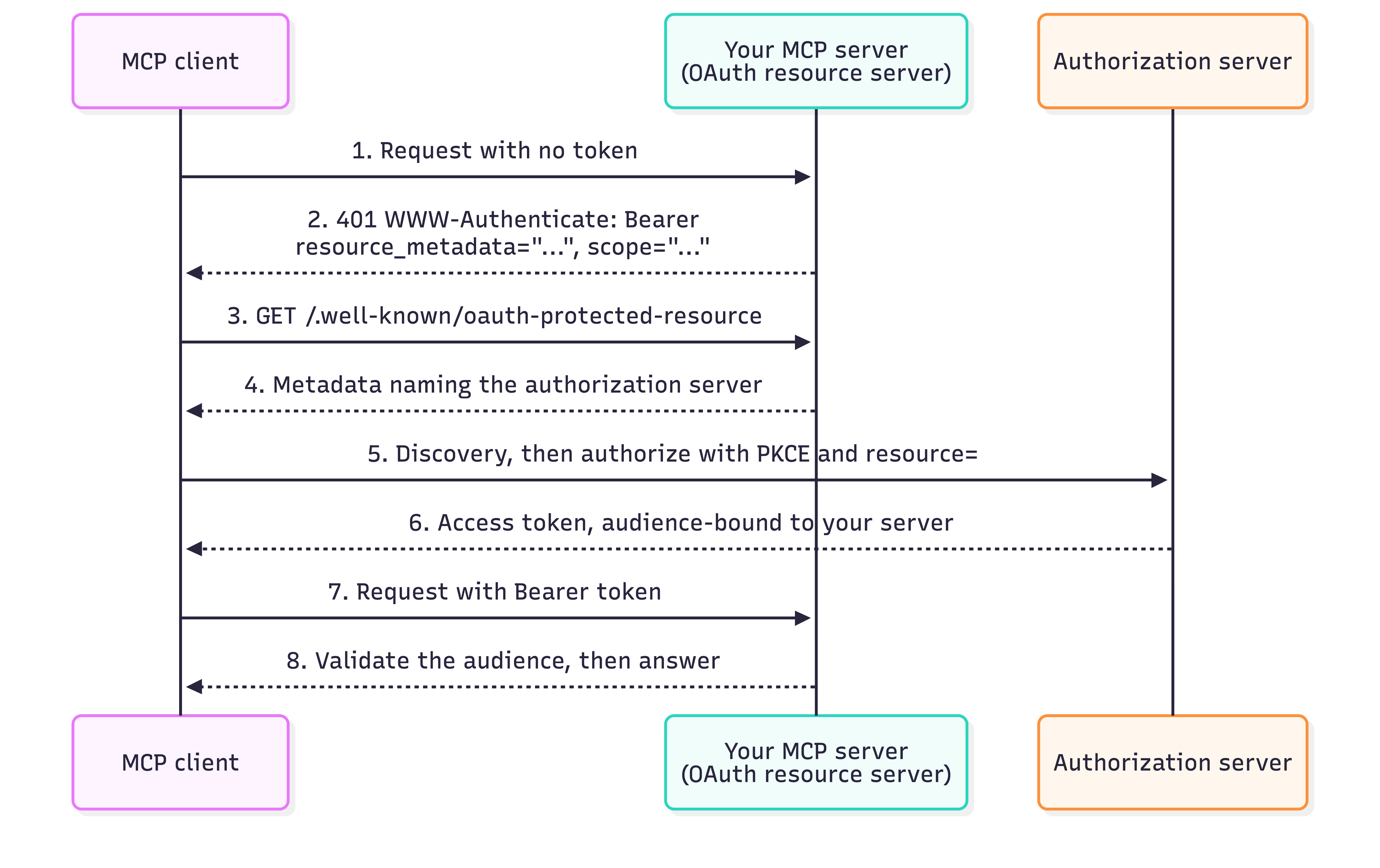
Four requirements are worth reading closely, because they are all on your side of the line. You MUST implement Protected Resource Metadata (RFC 9728) , which is a JSON document naming the authorization servers that can issue tokens for you. Your 401 has to point at it:
HTTP/1.1 401 Unauthorized
WWW-Authenticate: Bearer resource_metadata="https://mcp.example.com/.well-known/oauth-protected-resource",
                         scope="posts:read"
You MUST validate that an access token was issued specifically for you as the intended audience, per RFC 8707 , and reject anything else. A token that is valid, unexpired, and meant for a different service is not a token you may accept, and this is the requirement most likely to be skipped by someone who has previously written “verify the JWT signature” and stopped there. When a token is valid but its scopes are not enough, the server should answer with a 403 carrying error="insufficient_scope" and the scopes the operation actually needs, so the client can ask for them rather than guess.
The client’s side of that diagram, the PKCE parameters and the redirect dance, is the client’s problem, and the ecosystem largely handles it.
Which leaves the question of who plays the authorization server, and the specification is deliberately quiet about it: any OAuth 2.1 provider will do, so Okta, Entra, Auth0, Keycloak and friends are all fair game, as is Doorkeeper in your own Rails app if it is already an OAuth provider. That is the reassuring part. The part worth checking before you commit is that “our users can already sign in with it” is not the same question. Signing people in is authentication of humans. What an MCP client needs is an authorization server that can issue an access token scoped to your server, which is a shorter list of capabilities than most provider comparison pages lead with:
- It publishes discovery metadata, either RFC 8414 or OpenID Connect Discovery, since clients are required to find its endpoints that way.
- A client can obtain a client ID, whether through Client ID Metadata Documents (what the specification now prefers), Dynamic Client Registration (allowed, and deprecated), or plain pre-registration by an administrator.
- It honors the
resourceparameter, so the token it issues is bound to your server as the audience rather than being a general-purpose token for the whole provider.
Not every provider does all three, and the one that catches people is registration. If yours has no dynamic registration, the fallback the specification allows is pre-registering each client out of band, which is fine for a handful of known clients and painful past that. It is worth knowing which of these you have before the auth decision is made for you by whatever is already in the app.
The SDK will not do any of this for you. It has no authentication story at all, which is the right call for a transport, and it means the work lands in Rack middleware or a before_action, both of which you have written before.
Limiting what a caller can reach
Authentication answers who is calling. What they can reach is a separate question, and a tool’s blast radius is whatever its query can touch.
Our server only reads, and every model says so:
class Post < ActiveRecord::Base
  self.table_name = "posts"

  belongs_to :source
  belongs_to :category
  has_one :content, class_name: "PostContent", foreign_key: :post_id

  def readonly? = true
end
That is one line per model, and it is a guard against the common case, an accidental save or update reached from a tool that was only ever meant to read. It is not a hard guarantee: update_all, delete_all, and raw SQL all skip the instance-level check entirely. What sits on the other end of the connection is a model with a set of tools, and the boundary between answering questions about the data and changing it deserves more than a single override, a database user with no write grants being the actual floor.
For a server with more than one customer, the same principle applies to rows rather than to writes, and server_context is how identity gets there. A tool receives it as a keyword argument, which means scoping is a where clause like any other:
def self.call(query:, server_context:)
  posts = Post.where(account_id: server_context.fetch(:account_id))
  # ...
end
fetch rather than [] on purpose. If the context is ever missing an account, that should raise rather than quietly return a relation scoped to nil. The rule underneath is: never ask a description to enforce something a query can enforce. A model that is told to only look at one account will usually comply, but usually is not a security control.
Testing
Start with the cheapest question there is, which is whether the MCP server is running at all:
curl http://127.0.0.1:9292/up
That is the health endpoint from the Rack file, and it answers without going anywhere near the transport, so a failure there is Puma or boot configuration rather than anything to do with MCP.
For the protocol itself, the MCP Inspector connects the way a client would. It is a Node tool, so testing a Ruby server means having npx around. It has a browser UI, and it also has a CLI mode which takes the same arguments a client would use, prints the JSON-RPC result, and can go in a script. Listing the tools over HTTP, with the token:
npx @modelcontextprotocol/inspector --cli http://127.0.0.1:9292/mcp \
  --transport http --header "Authorization: Bearer $MCP_AUTH_TOKEN" \
  --method tools/list
Reading one of our own resource URIs, which exercises a different path through the server:
npx @modelcontextprotocol/inspector --cli http://127.0.0.1:9292/mcp \
  --transport http --header "Authorization: Bearer $MCP_AUTH_TOKEN" \
  --method resources/read --uri "blog://fastruby.io/style-guide"
Those two are worth running every time you change something. tools/list is the only place you see your tool descriptions and input schemas the way a client actually receives them, which is a different experience from reading them in the source, and it will show you an enum that quietly became a string or an optional parameter that became required. resources/read goes through the read handler and, for us, the files on disk, which is where a bad path or a bad encoding turns up. Both commands also test the middleware, because they are going through it. Run either one with the token changed by a character and you should get a 401 rather than a result, on the real path, with no mocking involved.
Locally, the stdio entry point is still the fastest thing to point the Inspector at, since it needs no server running at all:
npx @modelcontextprotocol/inspector bundle exec ruby server.rb
One warning about debugging any of this. When something goes wrong inside a handler, what comes back is “Internal error” and nothing else, and the detail is on stderr.
Conclusion
In this article, we went through what a Ruby MCP server needs once it stops being a subprocess: Streamable HTTP instead of stdio, a choice between a standalone service and an endpoint inside an existing Rails app, statelessness so it survives more than one Puma worker, Host and Origin validation that a security advisory made mandatory, a shared token as the internal floor with OAuth as the answer beyond it, and read-only models and server_context deciding what any caller can actually reach.
Almost none of that is protocol code. It is Rack, Puma, OAuth, and being careful about what your tools can touch, which is to say it is the work you already know how to do. The MCP-specific part is small, and the parts most likely to hurt you are the ones that look like configuration.
Two caveats worth carrying. The gem is young and its API has moved between releases, so pin it and re-read the changelog rather than trusting a snippet you found, including these. And the specification itself moved this week, so anything written about sessions before the 2026-07-28 revision is now describing a protocol that no longer exists.
Are you looking at putting an MCP server in front of your Rails application’s data and wondering what it takes to do it safely? Talk to us today!