
Upgrading a Deprecated Postgres on Heroku

Heroku sent us an email about the database behind ips.fastruby.io , a small app we run for sharing benchmark-ips results. That database runs Postgres 15, and the email gave it an end-of-life date on Heroku of January 20, 2027. If we do nothing before December 20, 2026, they will upgrade it to Postgres 18 for us.
Staying in control of when that happens beats finding out on Heroku’s schedule, so I upgraded it that same night. I skipped the method Heroku recommends for a documented one that suited this database better, and still finished the job with commands that are not in their documentation.
In this article, you will learn how we moved a Heroku Postgres database off a deprecated version, why we copied the data into a new database instead of upgrading in place, how much downtime to plan for, and which parts of Heroku’s tooling failed on us. We upgraded from Postgres 15 to 18, but the steps are much the same whichever version you are leaving behind.
The email that started it
Here is the email Heroku sent us:
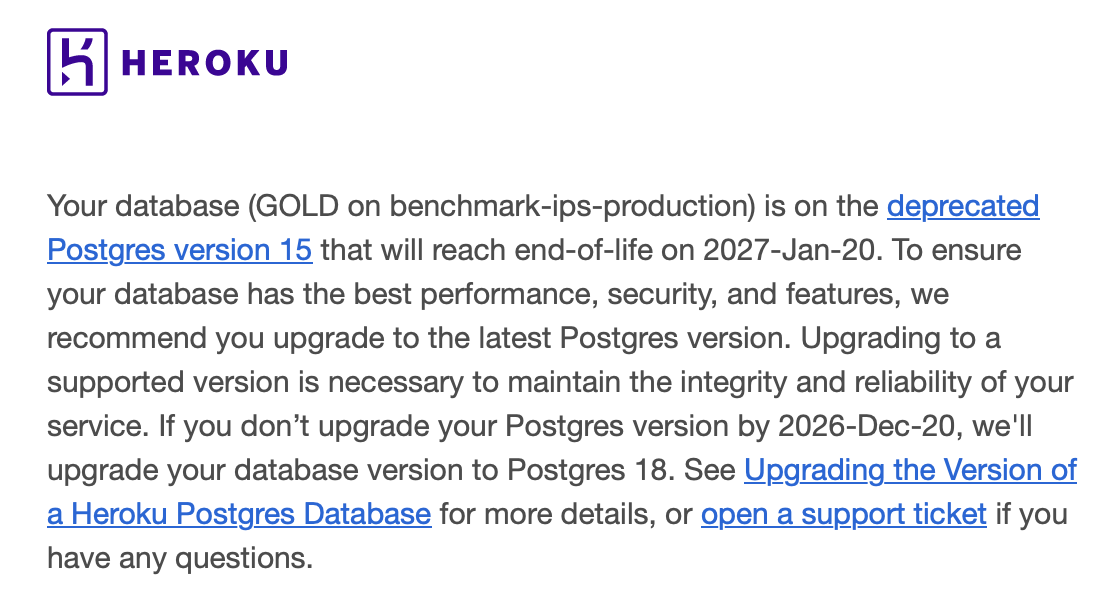
That date is Heroku retiring the version on their platform, not upstream PostgreSQL dropping support for it. It also travels with the notice rather than with the version: Heroku’s Postgres version support page lists Postgres 15 reaching end-of-life on February 28, 2027, later than the date in our email. Go by whichever comes first for your database.
The email names one database, and the dashboard has no aggregate view of versions, so the first thing to find out is whether your other apps are in the same position. There is no single command for that, but heroku apps speaks JSON, which is enough to ask each one:
for app in $(heroku apps --team your-team --json | jq -r '.[].name'); do
  version=$(heroku pg:info -a "$app" 2>/dev/null | grep "PG Version" | awk '{print $NF}')
  [ -n "$version" ] && echo "$app: $version"
done
Drop
--teamif your apps are personal. Apps without a database print nothing.
The reason to run this yourself, rather than letting the deadline arrive, is the downtime. Replacing a database version means putting the app in maintenance mode and taking it offline for a few minutes, and after the deadline Heroku picks that moment for you. I would rather schedule that outage myself than have Heroku cut requests off mid-flight.
Choosing how to upgrade
Heroku documents three ways to upgrade a database version , and they mostly differ in how long your app is unavailable.
A direct upgrade with pg:upgrade:run takes “around 10 minutes for most use cases, although this amount can vary”.
A follower failover needs 20 to 30 minutes. Copying the data into a new database needs “approximately 3 minutes of app downtime per GB of your current database, although this amount can vary substantially depending on your schema and database plan”.
I went with the data copy, for two reasons that had nothing to do with speed. The old database stays exactly where it is, so you can point the app back at it with heroku pg:promote if the new one misbehaves. And since you choose the plan when you provision a database, an upgrade is a good moment to move to a plan that matches how the app behaves today rather than when the database was created.
None of the three avoid downtime. The documentation is explicit that “all methods require some application downtime to ensure that no data is lost during the upgrade”, so pick a low-traffic window.
New databases are created on the current default version, 18.3 as of this writing, so provisioning one gets you the version bump for free:
heroku addons:create heroku-postgresql:<your-plan> -a example-app
heroku pg:wait -a example-app
heroku pg:info -a example-app
Freezing writes, and the part where pg:copy did not run
Before copying anything, the app has to stop writing. Maintenance mode alone is not enough, because it does not scale down your dynos, and a running dyno can still open connections and commit rows:
heroku maintenance:on -a example-app
heroku ps:scale web=0 -a example-app
While the app is down, check whether DATABASE_URL is a real attachment or a config var somebody set by hand years ago. Ours was the second kind, so pg:promote would have created the attachment while the hand-set variable kept pointing at the old database:
heroku addons -a example-app
If DATABASE_URL does not show up there as an attachment, unset it before promoting, and let Heroku manage it from then on:
heroku config:unset DATABASE_URL -a example-app
Heroku names each database attachment after a color, so yours will be something like
HEROKU_POSTGRESQL_GOLD_URL. I have relabeled themOLDandNEWin the commands below, including in the output, so it stays obvious which database is which.
With writes frozen and a fresh database waiting, the documented copy command failed:
$ heroku pg:copy HEROKU_POSTGRESQL_OLD_URL HEROKU_POSTGRESQL_NEW_URL -a example-app --confirm NEW
Starting copy of OLD to NEW... !
 ›   Error: Internal server error.
 ›   Error ID: internal_server_error
It failed twice, and heroku pg:backups showed no copy job at all, so nothing had started on Heroku’s side. The target was still empty and the source untouched, the good version of this failure.
So I fell back to a backup and a restore, which is the same idea through a different subsystem:
heroku pg:backups:capture HEROKU_POSTGRESQL_OLD_URL -a example-app
heroku pg:backups:restore b011 HEROKU_POSTGRESQL_NEW_URL -a example-app --confirm example-app
The b011 is the id the capture prints when it finishes, and heroku pg:backups lists them if you lose it. Pass it explicitly: leaving it out shifts the arguments along, so the target becomes DATABASE_URL and you restore the old database over itself.
The restore takes a --confirm because it destroys something: it wipes the target database before loading into it. The capture just writes a new backup, so it has no confirmation flag at all. Look closely at that value, though. Both destructive commands ask you to confirm, but they want different things: pg:copy wants the target database, pg:backups:restore wants the app. Passing the database name to the restore gets you this:
Error: Confirmation NEW did not match example-app. Aborted.
The restore aborts before it starts and leaves nothing under the Restores section of heroku pg:backups, so it looks like you never ran it. With the app name, it went through on the first try.
Falling back to pg_dump and pg_restore
Later that night the restore started failing the same way on another database, so I moved the data myself. This is an escape hatch, not the path I would recommend.
These commands run on your own machine, not on a Heroku dyno. pg_dump and pg_restore are ordinary Postgres clients that connect over the network like your app does, so a full copy of your production database lands on your laptop before going back up to the new one.
That is a problem that has nothing to do with Postgres. If your database holds personal data, health records, payment details, or anything else covered by an agreement you have signed, downloading it to a development machine may violate that agreement no matter how careful you are with the file afterwards. Heroku’s copy and restore commands keep the data inside their infrastructure, and the in-place pg:upgrade:run never moves it at all. When the data is sensitive those are the better answers, and a support ticket beats a local dump when they fail.
Ours holds public benchmark results and no personal data, which is the only reason I was comfortable doing this. Size matters too: the round trip is quick for a small database and slow for a large one.
The clients have to be at least as new as the server you are dumping from: “pg_dump cannot dump from PostgreSQL servers newer than its own major version; it will refuse to even try”. On macOS, brew install libpq is enough.
Get both connection strings first, then dump and restore:
OLD_URL=$(heroku config:get HEROKU_POSTGRESQL_OLD_URL -a example-app)
NEW_URL=$(heroku config:get HEROKU_POSTGRESQL_NEW_URL -a example-app)

pg_dump -Fc --no-owner --no-privileges -f old.dump "$OLD_URL?sslmode=require"
pg_restore --no-owner --no-privileges --no-comments -d "$NEW_URL?sslmode=require" old.dump
-Fc asks for the custom archive format, which is compressed and is what pg_restore expects; a plain SQL dump works too but goes through psql instead. --no-owner and --no-privileges drop ownership and grant statements you cannot apply anyway, because Heroku gives you no superuser.
This worked on the first attempt, after two of Heroku’s own commands had not. Expect one harmless error about not owning pg_stat_statements, for the same superuser reason. Delete the dump file afterwards.
Then promote the new database, bring the app back, and check the data:
heroku pg:promote HEROKU_POSTGRESQL_NEW_URL -a example-app
heroku ps:scale web=1 -a example-app
heroku maintenance:off -a example-app
Row counts are the obvious check, and the lesson I keep relearning, including the time I moved another app from Heroku to Railway . The easier one to forget is the sequence behind each primary key, because a stale sequence starts handing out ids that already exist:
heroku pg:psql -a example-app -c "select last_value from reports_id_seq"
That shells out to a local psql, so it fails with “The local psql command could not be located” if you skipped the client tools. heroku run rails runner works instead.
Conclusion
In this article we moved a Heroku Postgres database off a deprecated version by copying it into a newly provisioned database, which also gave us a moment to reconsider the plan, and we went through the commands that failed on the way. If both pg:copy and pg:backups:restore fail for you, the local dump is there, but when the data is sensitive a support ticket is the better next step.
A few things worth keeping in mind. The table counts in pg:info lag by several minutes, so a fresh restore can report zero tables while the data is already there, and only a direct query is worth trusting. Keep the old database for a few days before destroying it, since it is your cheapest rollback. And update the Postgres image in your CI workflow, because one pinned to postgres:15.17-alpine keeps testing the version you just left.
The app whose database started all this is at ips.fastruby.io . Point your benchmark-ips script at it and you get a shareable link for your results instead of a wall of terminal output.
Is your team carrying deadlines like this one behind a product roadmap that never has room for them? We can help you deal with that maintenance work .