
Draining The Churn Swamp

For anyone that has ever used RubyCritic, churn calculations were always painful. Especially for projects with commit histories going back to when YouTube was mostly cat videos.
Here I’ll relate the story of how we were able to make churn calculations cut down from 30 minutes to just a few seconds or 4 or 5 minutes at worst.
The actual problem
Here at OmbuLabs we use RubyCritic everyday. Because many of our clients come to us wanting to upgrade their Rails applications or do gradual improvement work with Bonsais , we need to do static analysis of their code in order to identify possible issues while changing their code base and also have information on how much tech debt and complexity their applications have.
One of the pains we always felt using this tool was just how long it took to get a report, especially when analysing a project’s churn. Like I said in the intro, these could take very long to finish. If you were lucky and the project had few changes, maybe some 3 minutes. If the project was old and had many changes (90% of them), it could easily take up 30 or 40 minutes. It almost felt like “I’m running RubyCritic” was the new “It’s compiling”.
The worst part was that, being an open source project, this not only affected us but also others that reported to us that the main reason they just didn’t use RubyCritic was how long it took to run.
We needed to make running this tool something pleasant again.
How we found it
The first thing we thought was to integrate the churn gem itself into RubyCritic.
However, we soon realized that this integration might not be such a straightforward task. The API was different, the return objects were different, a lot was different, and we’d have to make the effort to study how the gem worked, what was its output and make that work with what RubyCritic expected. Not to mention checking whether the churn gem even gathered churn data the same way our module did (it doesn’t).
And so we had an idea: well, maybe there’s a way to make our own implementation just be faster. After all, it doesn’t need to be blazing fast. It just needs to be fast enough.
And here is where we decided to leverage an LLM. The code used to calculate churn is somewhat complex and connects with a few other modules in RubyCritic and we had only three hours to make sense of it. And so we fired up codex and just asked it if it could read the churn module and point out to us why it was so slow.
It didn’t take long. This was the problematic piece of code:
def filename_for_subdirectory(filename)
  if @git_root == Dir.pwd
    git_path = Git.git('rev-parse --show-toplevel').strip
    cd_path = Dir.pwd
    if cd_path.length > git_path.length
      filename = filename.sub(/^#{Regexp.escape("#{File.basename(cd_path)}/")}/, '')
    end
    [filename]
  else
    filename
  end
end
Specifically, this line:
git_path = Git.git('rev-parse --show-toplevel')
When calculating churn, RubyCritic needs to know what file it must work on. To do so, it prints out the log of all files
changed up to the beginning of the repo’s history (a lot, yes, and maybe a default to be discussed), and then goes line by
line of this long identifying the type of change. For any changes that aren’t renames, it tries to make sure to grab the
correct filename even if inside a project’s subdirectory. I also won’t go into explaining this method, since that’s out of
scope for this article. The important bit is that, to do what it needs to do, it shells out to git to get the top level
folder. This is already a more expensive than normal operation.
And it would do this for every line of the git log. In other words: for every change that isn’t a rename of every file all the way back to the first commit. If you have only a few files and a little history, you might not notice. But it won’t be long before churn becomes the major hangup, to the point that RubyCritic might just not be usable.
Draining the swamp
Okay, so how do we fix this? Well, for one, the name of git’s top level folder isn’t known for changing within a given project. Actually, it doesn’t change at all. So it only seemed reasonable to memoize that variable:
def filename_for_subdirectory(filename)
  if @git_root == Dir.pwd
    git_path = git_top_level
    cd_path = Dir.pwd
    if cd_path.length > git_path.length
      filename = filename.sub(/^#{Regexp.escape("#{File.basename(cd_path)}/")}/, '')
    end
    [filename]
  else
    filename
  end
end

def git_top_level
  @git_top_level ||= Git.git('rev-parse --show-toplevel').strip
end
And that’s all it took. I left some flamegraphs below for illustration purposes.
Some charts
It’s a simple change. You might be wondering: “Ok, that’s cute, but gib me numbers”. No problem. We decided to take this baby for a spin on quite the significant repository: Rails.
Not only because it’s the de facto ruby web framework used just about everywhere and by everyone, but also because it’s a very big codebase with lots of commits.
Here’s the data for the previous slow churn implementation:
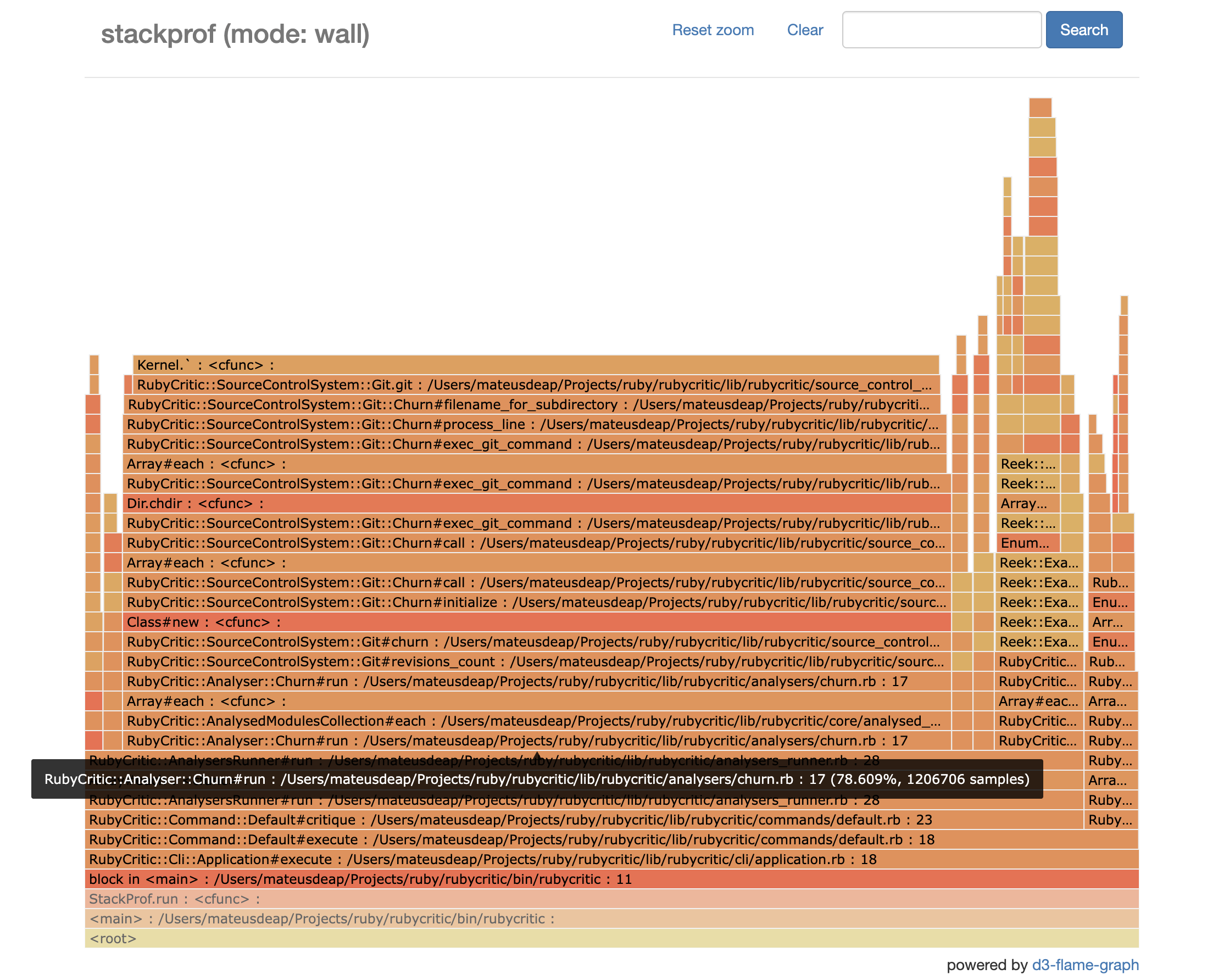
See that big bar there that makes the flamegraph more like a plateau? That’s indicative of how much time (wall time) was spent calculating churn. 78.6% of it to be exact. Since the whole thing took about an hour to run, the math tells us that that’s way more seconds than we’d like.
Now let’s see after the change:
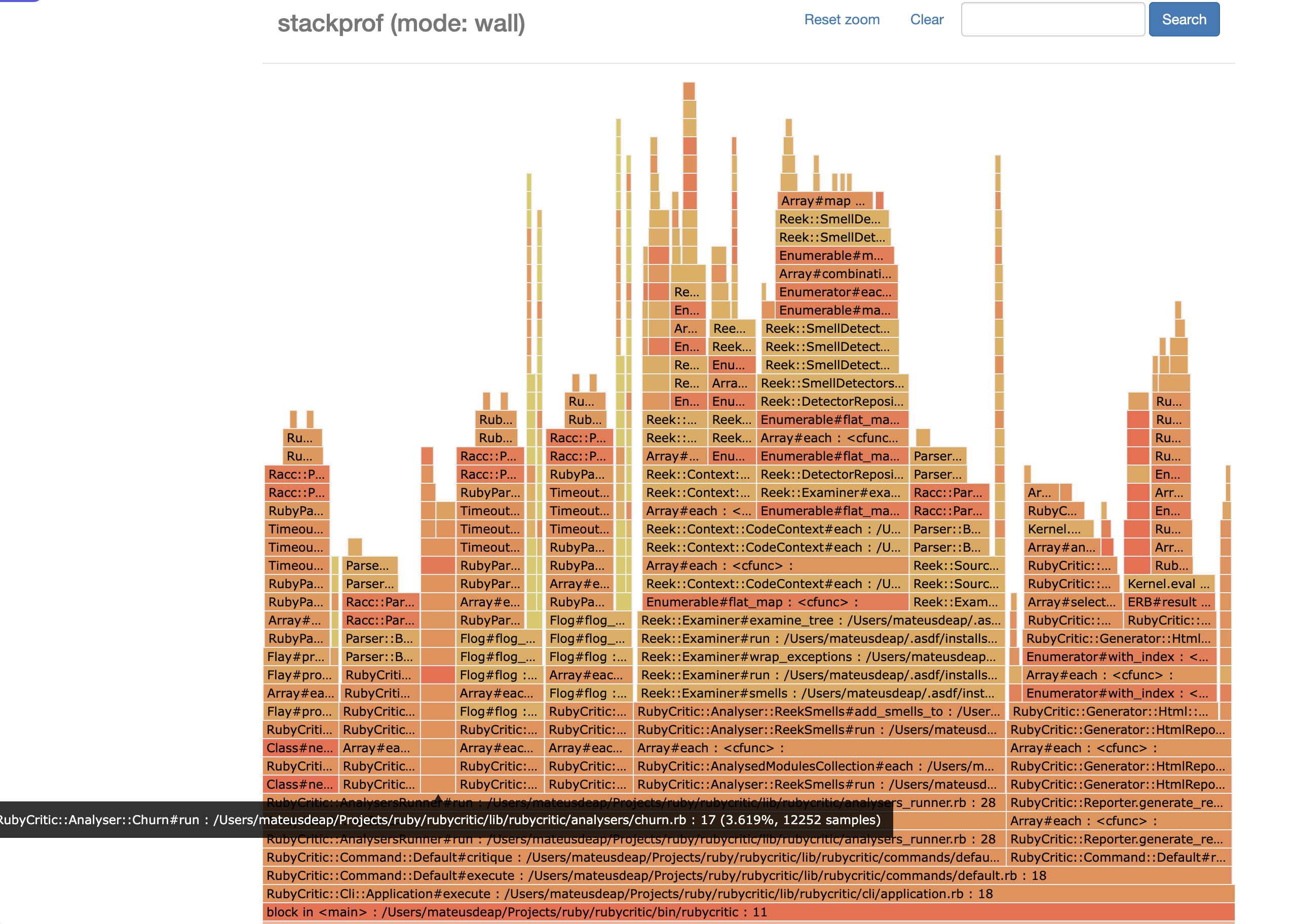
Now that’s a nice flame-looking flamegraph! And notice the tooltip: 3.6% of the runtime! The amount of time shaved off just feels like magic.
I won’t reproduce the numbers for the benchmarks in the PR here because you can see them for yourself .
We went from about an hour of execution time for Rails down to 4 friggin’ minutes. Now that’s an improvement!
Conclusion
If you have ever tried using RubyCritic in your projects or at work and dropped it because of how numbingly slow churn calculations were, I urge you to try it again. It’s honestly very useful and can give you a lot of insights in just one go.
I don’t say this just because we maintain the tool here at OmbuLabs, but because I actually use it almost every day on our
client projects. It’s what we use to show you “Hey, see this? We should probably make it better” or “See how bad
critical_model.rb’s score was when we started and how good it is now?”. Among other things: assessing how complex an upgrade
might be, identifying possible challenges we might face in order to migrate your application to using StrongParameters. Or
even to help us assess how difficult making that stressed out API look well and RESTed. If you catch my drift.
If you liked this article, it might be that you’ll like to check out some of our services . Maybe we can find a way to make your app hum just like a song without you having to stop making new features! Or maybe we can do even more. If so, don’t be shy, just send us a nice message here and let’s chat!