
Rails World '26: Hot Cell for Active Storage

I was in the audience at Rails World 2026 when Mike Dalessio, a Rails Core team member who joined earlier this year, put up a slide that said “You are not worried enough (probably).”
He had good reasons to say it.
This summer, Mike handled CVE-2026-66066 , an Active Storage vulnerability that let a crafted image upload read files from the server, including your application’s secrets.
His talk, Hot Cell: Securing Active Storage in the age of AI , was half post-mortem and half proposal: if we can’t stop image libraries from being vulnerable, maybe we can stop their vulnerabilities from reaching our secrets.
In this article, you will learn what that CVE actually meant, why patching image libraries is no longer enough, how Hot Cell sandboxes Active Storage, and whether you can use it in your Rails application today.
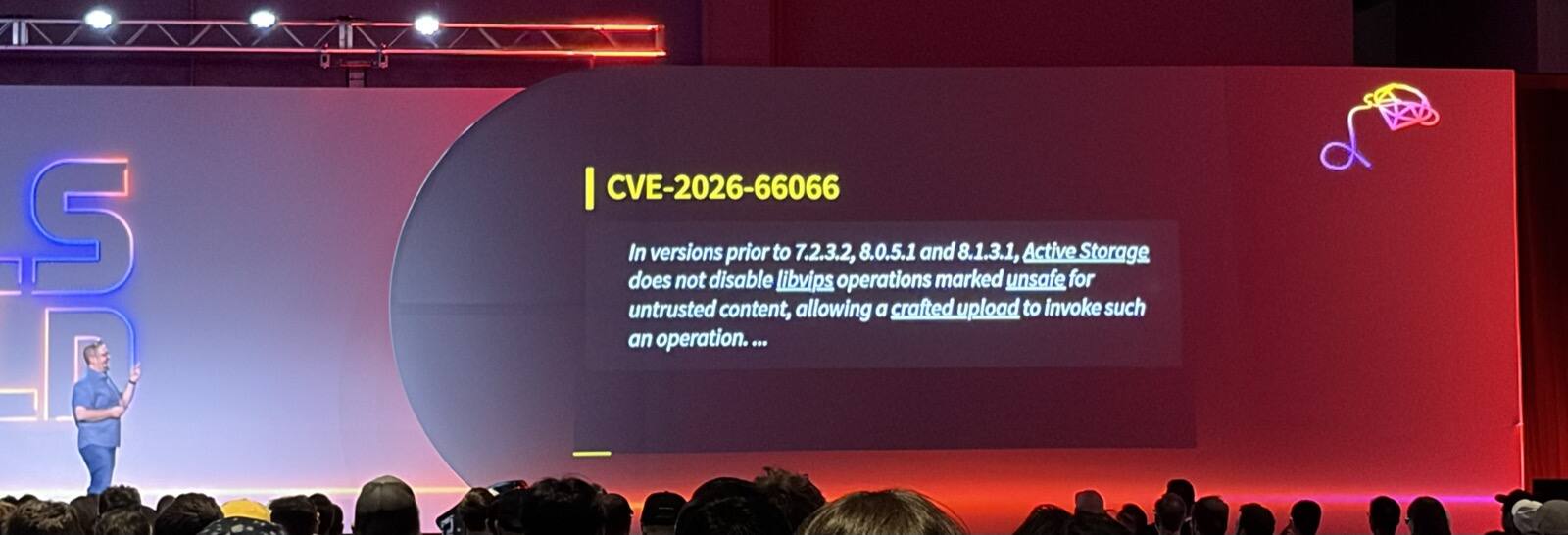
CVE-2026-66066, Decoded
Mike opened with a confession. His original proposal was a talk about a Markdown API for Action Text, but he spent most of the summer “heads down working in reactive mode on security issues in Rails,” so he switched topics.
Then he took the advisory apart, one sentence at a time.
Active Storage does two things with an upload: it saves it, and it transforms it (for example, into the thumbnail you see in an activity feed).
This CVE lives in the second half. Rails’ VipsTransformer hands the image to libvips, which looks at the file, guesses what
it is, and routes it to the library that should handle it.
Some of those libraries are familiar, like libpng and libjpeg. Some have a long history of security problems, like
ImageMagick. And some you have probably never heard of.
When Mike installed libvips on a slim Ruby Docker image, the dependency list came to over a hundred libraries. libvips tries
to manage that risk by marking libraries as trusted or untrusted, based on whether they have been fuzz tested to its
maintainer’s satisfaction. ImageMagick and libmatio are both untrusted.
The “who is affected” part of the advisory covers almost everyone. New Rails applications default to libvips, and Mike’s
advice was to treat every user as untrusted.
The Impact of CVE-2026-66066
The impact is what makes it scary. Your Rails process runs on a filesystem that holds your source code, your credentials, and your environment variables.
A crafted upload could trick that chain into reading those files and sending their contents back inside the thumbnail.
Once an attacker has secret_key_base, there are known ways to turn it into remote code execution. With your database
or Redis credentials, they can move laterally into other systems.
Mike’s team scored it 9.5 on CVSS, which is about as bad as it gets.
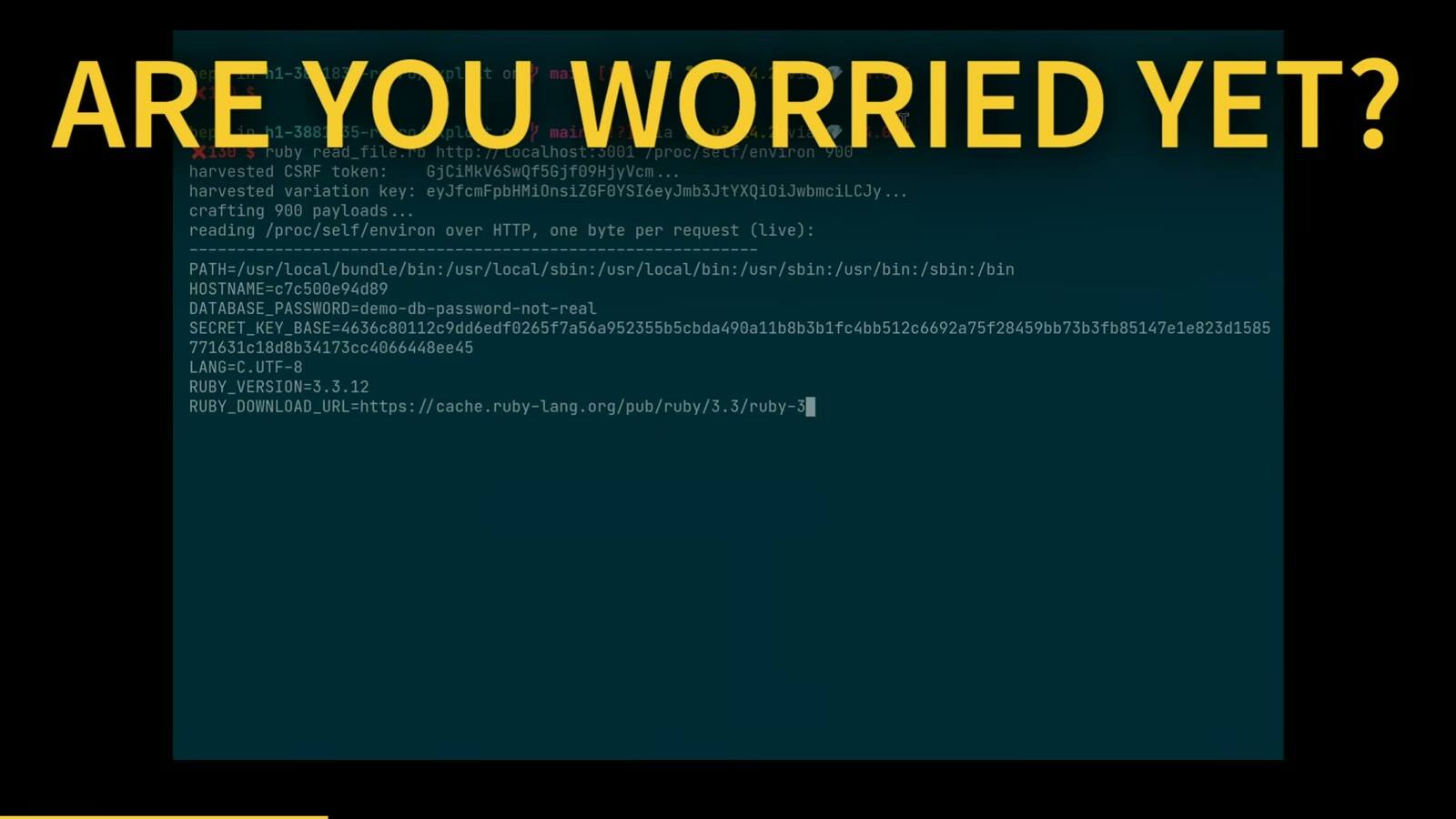
He also showed a recording of the exploit running against a development app. The script read /proc/self/environ one byte
per request and printed the app’s database password and secret_key_base in real time.
The part that stuck with me the most is that there was no single big bug behind it. Mike’s slide listed seven small things that got chained together:
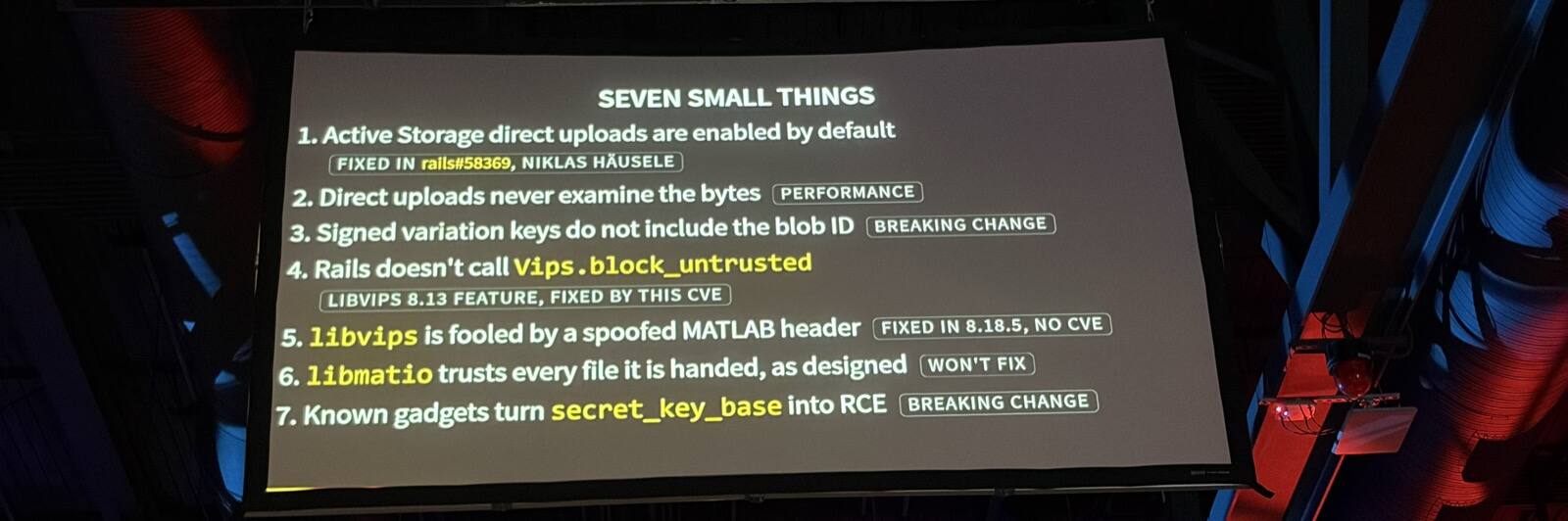
On its own, none of them looks like a 9.5. Direct uploads were enabled by default, even in apps that never used them (since fixed in rails#58369 by Niklas Häusele).
Direct uploads go straight from the browser to the storage service, so Rails never sees the bytes and has to trust the content type the client reports. That’s a deliberate performance trade-off.
libvips added Vips.block_untrusted in version 8.13, but you had to opt in, and Rails didn’t.
Calling it is the actual fix in this CVE. The spoofed MATLAB header was fixed in libvips v8.18.5, without a CVE of its own,
and the libmatio maintainers consider their part working as designed: you shouldn’t hand them untrusted files.
The last two items, the signed variation keys and the known gadgets that turn secret_key_base into RCE, are breaking changes to fix,
so they are still open.
The AI part comes next.
Based on that intentionally vague advisory, multiple independent parties used AI to rediscover the whole chain and published their results.
On stage, Mike said the first ones showed up in under an hour.
If you haven’t patched yet, the fixed versions are 7.2.3.2, 8.0.5.1, and 8.1.3.1. As Gelsey explained in
Why Patching the Gem Didn’t Fix CVE-2026-66066 ,
the fix also depends on the libvips version in your container image, so bumping activestorage might not be enough.
378 vulnerabilities and counting
Fixing one CVE doesn’t help much if the next one is already on its way. We covered the broader CVE landscape in Don’t Just Upgrade Rails: 7 CVEs to Patch earlier this year.
Mike searched the National Vulnerability Database for CVEs published between January 1 and September 20, 2026 in libvips and
the libraries it can delegate to, and vetted the results by hand.
He found 378. ImageMagick alone accounted for 161, followed by OpenEXR (40), libheif (32), and libvips itself (18).
None of this is something Rails can fix directly.
Rails can add allow lists and block lists, or refuse specific library versions, and that might reduce the attack surface somewhat. But these libraries belong to other projects, and AI keeps getting better at finding bugs in them.
So Mike framed it as a risk problem:
risk = probability × impact.
The probability of another vulnerability in one of these libraries is high, and in his words “probably not going down anytime soon.” That leaves impact. If one of those libraries gets exploited tomorrow, how much damage can the attacker do?
That question is what led to Hot Cell.
How Hot Cell works
The answer most of us would shout out is “sandbox it,” and that’s where Mike went.
What I liked is that he started from requirements. A sandbox for Active Storage had to:
- Be a drop-in replacement for Rails’ existing analyzers, transformers, and previewers.
- Run as an unprivileged user, with no capabilities and no way to escalate privileges.
- Enforce hard limits on wall-clock time, memory, file size, open files, and process count.
- Have no access to the application’s filesystem: no app code, no credentials, and a read-only,
noexecfilesystem. - Have no access to the application’s environment, so there are no secrets to exfiltrate.
- Have no network interface, so there is nothing to move laterally to.
- Be disposable, with one process per request that gets killed and reaped when it’s done.
- Deploy with the tools you already use for the rest of your app.
- Be extensible, so you can run your own code on untrusted inputs too.
In practice, Hot Cell is a sibling container that runs next to your app on the same host.
The Rails side and the cell side ship as separate gems.
Your application loads activestorage-hotcell-client, and the cell loads activestorage-hotcell-server, and both sit on top of
a shared hotcell-core.
The cell doesn’t load Rails or your application at all. Mike’s advice was to keep the cell’s Gemfile short, because every gem
in it is inside the blast radius.
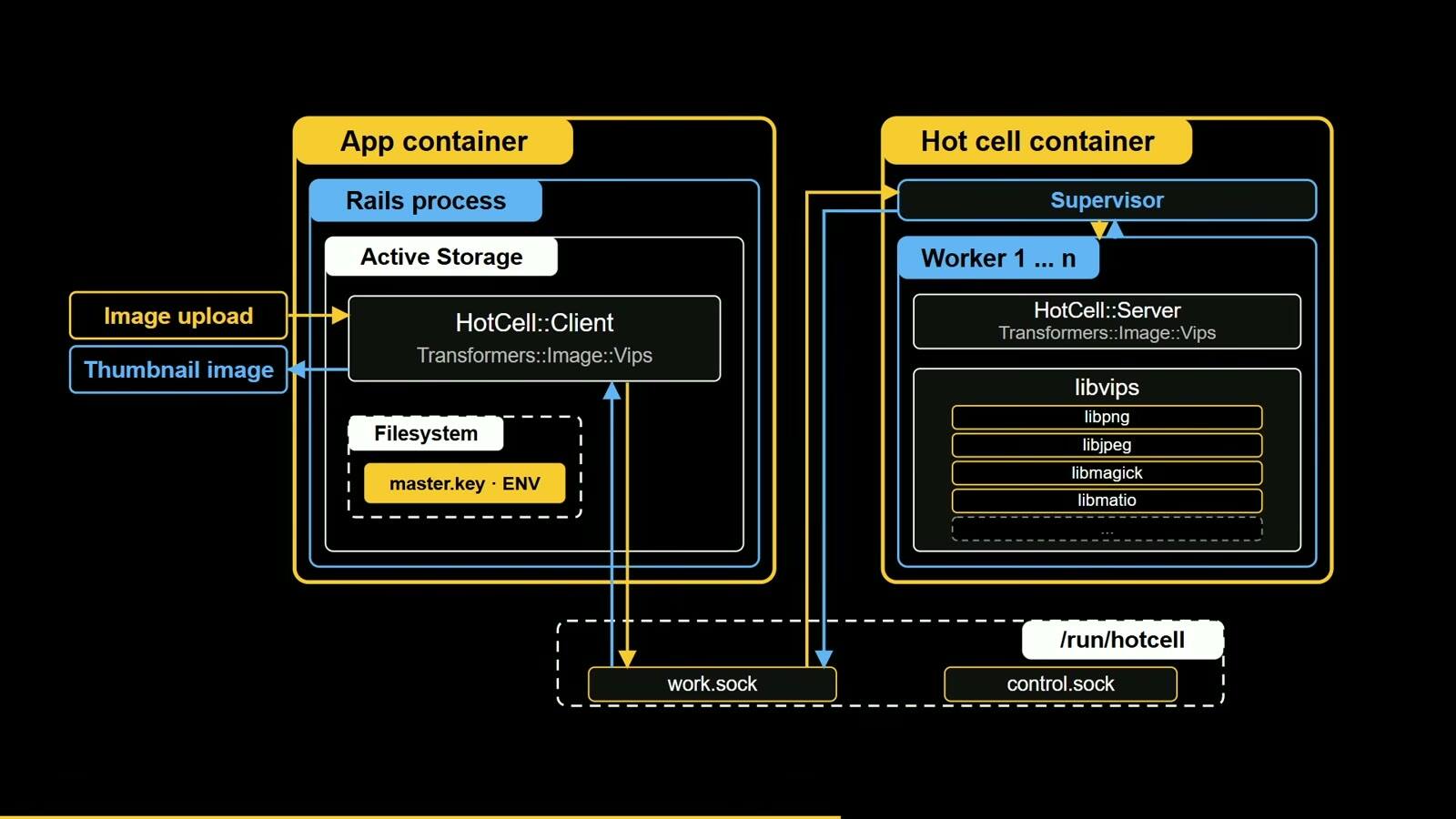
The two containers talk over UNIX sockets on a shared volume. A UNIX socket lives on the filesystem instead of a network interface, so the cell can run with no network at all and nothing is routable.
Inside the cell, a supervisor runs as PID 1. It accepts connections, queues them, hands each one to a worker, enforces the deadline, and kills and reaps the worker’s process group when it’s done.
The supervisor never reads a request and never touches a byte of image data.
Each request gets its own worker process, forked from the supervisor. If a crafted file does manage to exploit libvips or one
of its dependencies, the attacker ends up in a short-lived process that is about to be reaped.
Wiring it into Rails
A sandbox doesn’t help much if adopting it means rewriting every place your app calls variant or preview.
Mike’s goal was to make Hot Cell a configuration change, and Active Storage already has the seams for it: the variant processor, the analyzers, and the previewers are all configuration.
Here is what those settings look like in a default Rails application, trimmed to the classes that matter for this talk:
# config/application.rb
config.active_storage.variant_processor = :vips

config.active_storage.analyzers = [
  ActiveStorage::Analyzer::ImageAnalyzer::Vips,
  ActiveStorage::Analyzer::VideoAnalyzer
]

config.active_storage.previewers = [
  ActiveStorage::Previewer::MuPDFPreviewer
]
With Hot Cell, you point each of those settings at a client class that forwards the work to the cell:
# config/application.rb
config.active_storage.variant_processor =
  ActiveStorage::HotCell::Client::Transformers::Image::Vips

config.active_storage.analyzers = [
  ActiveStorage::HotCell::Client::Analyzers::Image::Vips,
  ActiveStorage::HotCell::Client::Analyzers::Video::FFprobe
]

config.active_storage.previewers = [
  ActiveStorage::HotCell::Client::Previewers::Pdf::Mutool
]
Your models, controllers, and views don’t change. There is one catch, which I’ll come back to later: swapping out the variant processor like this needs Rails 8.2, which hasn’t been released yet.
You don’t have to move everything at once, either. Rails’ own classes mix freely with the Hot Cell ones in the analyzers
and previewers arrays, so you could send PDF previews to the cell and keep video previews in the app while you test it.
The setup starts with the client gem in your application’s Gemfile and an installer:
bundle add activestorage-hotcell-client
bin/rails hotcell:install
The installer creates a hotcell/ directory in your application root with its own Gemfile, Dockerfile, config.rb, and
an operations/ directory. That directory is everything that goes into the cell, kept apart from your application code.
In the cell’s Gemfile, you add activestorage-hotcell-server. Then you require the operations that match the client classes
you configured. Requiring an operation’s file is what makes the cell serve it:
# hotcell/operations/active_storage.rb
require "active_storage/hot_cell/server/transformers/image/vips"
require "active_storage/hot_cell/server/analyzers/image/vips"
require "active_storage/hot_cell/server/analyzers/media/ffprobe"
require "active_storage/hot_cell/server/previewers/pdf/mutool"
Requiring the files one at a time, instead of through the gem’s entry point, also means the cell never loads operations for tools its image doesn’t install.
In the example Mike showed, that kept the ImageMagick operations from ever loading.
On the application side, an initializer registers the cell. The v1.0 README asks you to pass two of your own exception classes, one for permanent failures (a file that will never convert) and one for transient failures (the cell is busy or down):
# config/initializers/hotcell.rb
HotCell.root  = ENV["HOTCELL_ROOT"]
HotCell.group = ENV["HOTCELL_GROUP"]

HotCell.register "active_storage",
  permanent: MyApp::UnprocessableUpload,
  transient: MyApp::ConversionTemporarilyUnavailable
I like the failure mode here. If HOTCELL_ROOT is unset, every variant, analysis, and preview raises
HotCell::CellNotConfigured instead of quietly falling back to processing the file inside your application.
A misconfigured deploy fails loudly instead of silently undoing the sandbox.
Finally, hotcell/config.rb sets the cell’s limits. This is the example from the README:
# hotcell/config.rb
HotCell.limits concurrency: 4, queue_size: 8, deadline: 60, memory: 1536 * 1024**2
Each operation declares its own limits too, and the cell clamps them to its own. Mike described the cell’s limits as a ceiling.
Lessons from Basecamp
37signals already runs Hot Cell in production, and Mike was candid about how that went.
HEY and Fizzy were the easy ones. Both are relatively new Rails applications that only use Active Storage’s own analyzers and transformers, and neither handles a lot of attachments. Porting them came down to the configuration from the previous section plus deploying the cell next to the app.
Basecamp was harder. A lot of its code predates Active Storage, so it needed custom operations, and it handles a lot of attachments. In Mike’s words, outages can teach you a lot.
Custom operations are the extensibility requirement from earlier.
An operation is shaped like an Active Job: a routing name, its own limits, and a perform method that receives the file descriptors
and keyword arguments. This is the example from his slides, which runs inside the cell:
# hotcell/operations/extract_text.rb
class ExtractTextOperation < HotCell::Operation
  operation "extract_text"
  limits deadline: 30.seconds, memory: 1280.megabytes

  def perform(inputs, outputs, format:, pages: [])
    source, = inputs
    destination, = outputs

    complicated_image_manipulation(source, destination, format:, pages:)
  end
end
On the Rails side, a small HotCell::Client subclass names the cell and the operation, and you call perform_in_hotcell as a
blocking method. Mike said Basecamp has 12 custom operations in its cell so far.
Can you use it today?
The answer depends on what you want to use it for.
At Rails World, Mike’s “Toward v1.0” slide had three items, and the first one was “Rails 8.2 needs to ship.” Hot Cell didn’t wait: v1.0.0 came out on October 5.
Rails 8.2 is still unreleased as I write this, though.
That matters because of the seam I mentioned earlier. Setting config.active_storage.variant_processor to a class was added
in rails#58384 , which was merged into main in August and hasn’t shipped in a
release yet.
Until it does, the Hot Cell docs recommend tracking Rails main if you want to use the Active Storage gems.
The core hotcell-* gems don’t depend on Rails, though. If you have your own code that handles untrusted files (the README
mentions ZIP files and CPU-heavy work as other candidates), custom operations don’t need to wait for 8.2.
When you do adopt it, there is one step that’s easy to miss: remove libvips, ffmpeg, and the other tools from your
application’s image once the cell handles those file types.
In the meantime, there are two things from the last part of the talk you can use right now.
The first is the rails-forensics-CVE-2026-66066 repository.
Mike argued that vulnerability reports should come with their own agent skills, and this is what that looks like: two reference
documents (the-attack.md and the-investigation.md) and two agent skills, kr2s-was-i-vulnerable and
kr2s-was-i-exploited.
They came out of his own work fixing the vulnerability and checking for it at 37signals. If you never checked whether your app was hit by this CVE, that’s a good place to start.
The second is a habit. Mike used Claude and Codex heavily for adversarial review and red-teaming while he built Hot Cell, and he said it caught real gaps before the software rolled out.
He was careful about the claim: he didn’t say Hot Cell has no vulnerabilities, only that it has fewer than it would have without that review.
I think that’s a fair way to put it, and it’s the same idea as the attack in the first half of the talk, pointed at your own code before someone else points it at you.
He also answered the question I expect a lot of people had:
Is this AI’s fault?
His answer was that it’s partly to blame. AI found this CVE by chaining low-severity flaws together, and it made the embargo pointless by reverse-engineering the attack from a vague advisory.
But the flaws were already there, in software humans wrote when we trusted our inputs more than we should have. His closing ask was to scratch your own itch: improve the systems we have, or replace them with better ones, the way he did with Hot Cell.
Conclusion
In this article, we talked about how CVE-2026-66066 chained seven small issues into a critical one, why 378 vulnerabilities in image libraries this year make patching them one at a time a losing game, and how Hot Cell moves Active Storage’s file processing into a sandbox that holds nothing worth stealing.
If you haven’t patched yet, do that first: upgrade to 7.2.3.2, 8.0.5.1, or 8.1.3.1, and check which version of
libvipsyour container image actually ships.
Then keep an eye on Rails 8.2, because that’s when Hot Cell’s Active Storage gems become an option for most of us. It’s important to note that most of the risk Mike described sits below your Ruby code, in the system libraries, base images, and operating system packages underneath your app, which are easy to forget about until a CVE like this one shows up.
I’m grateful that Mike is now part of the Rails Core team. Someone who spends a summer handling a vulnerability like this, and then comes back with a sandbox, a forensics repo, and a talk explaining all of it, is exactly who you want there.
I’m also grateful that Active Storage is getting the security attention it deserves. It sits right where untrusted uploads
meet more than a hundred system libraries, and for a long time most of us (myself included) didn’t think much about what
happened after variant got called.
AI is raising the bar for how we react to new CVEs.
Bad actors are already using it to turn a vague advisory into a working exploit within a day, and sometimes within an hour. I expect engineering teams to adapt to the times and use AI the same way on the other side: to figure out whether they’re affected, write the patch, test it, and ship it faster than we used to.
Not sure what’s sitting in your Docker images, or how many known vulnerabilities your system libraries carry? Our infrastructure assessment looks beyond Ruby and Rails, at your container images, Linux base images, and system libraries. Talk to us today!